build notes · browser extension · developer tools
Gemini Chat Organizer
A useful conversation deserves a place you can find again.
Abdul Wahab · Islamabad, Pakistan
the problem
Long chat histories make useful conversations and prompts difficult to find again.
my part in the build
Built and published Gemini Chat Organizer as a Chrome extension.
I built the folder organization, drag-and-drop workflow, and reusable prompt library using TypeScript and JavaScript, then published the extension to the Chrome Web Store.
how it fits together
The main flow, from input to something useful.
- 01
Open Gemini
The extension adds an organizer panel to the Gemini sidebar.
- 02
Give chats a home
Folders, subfolders, color coding, and drag-and-drop organize conversation links.
- 03
Reuse a prompt
The prompt library stores snippets that can be inserted into the Gemini composer.
a few decisions behind the interface
- Keep the organizer beside the conversation
- The extension works within gemini.google.com. Organizing chats and inserting a saved prompt happen in the same place as the conversation.
- Scope styles to the extension
- The published listing describes using Shadow DOM to keep the organizer's styles separate from Gemini's interface. Theme support also follows the host page's light or dark appearance.
- Preserve account context
- Conversation links retain the active Google account context, such as /u/1, so an organized chat opens under the right profile.
what changed, and what you can check
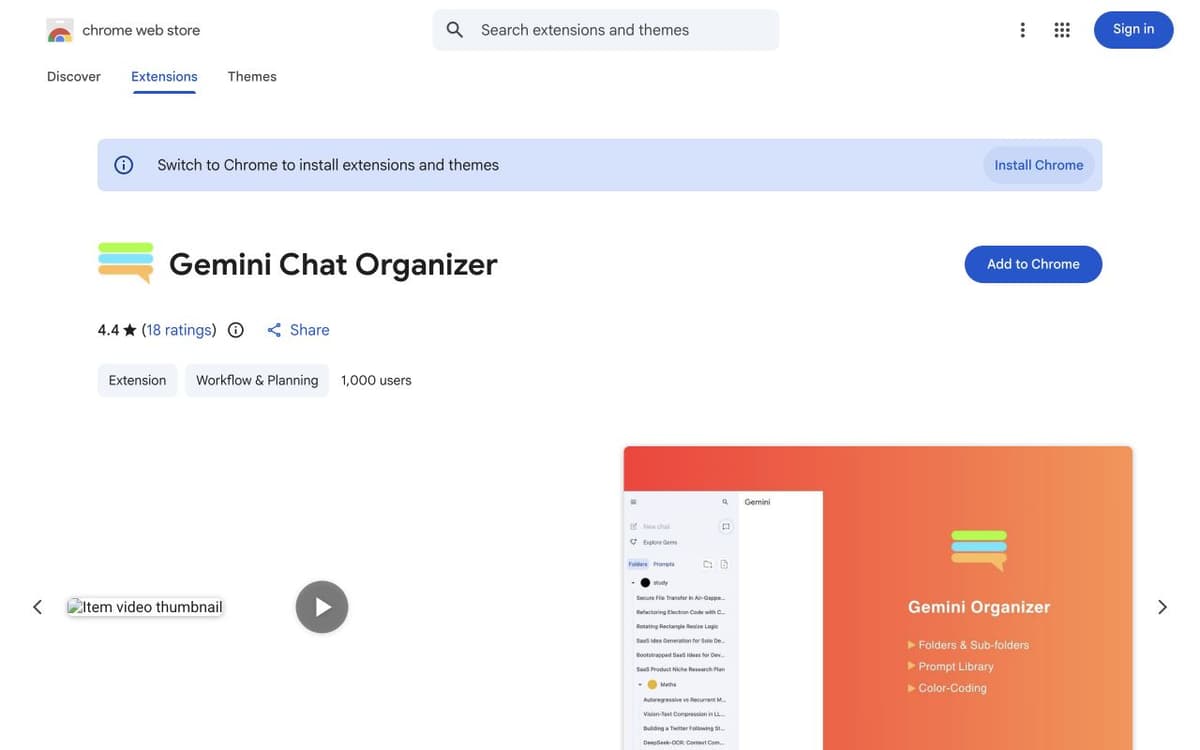
The Chrome Web Store lists 1,000 users and a 4.4 out of 5 rating from 18 ratings, checked October 10, 2026. Those figures are a dated snapshot of the public listing.
The store listing provides the user count, rating, screenshots, feature descriptions, and version history. Version 1.1.3 was listed as updated May 20, 2026.
View the public source ↗