Load balancing: what a load balancer does and costs
Suppose one of three order servers runs out of database connections on a Friday afternoon. It still accepts connections. A load balancer sits in front of the three and hands each request to one of them. It keeps choosing the broken server. Every order that lands there fails. The load balancer gave clients one address. It did not remove the failing server. An address alone is not enough if the balancer keeps using a broken server.
One address in front of many servers
A load balancer sits in front of a group of servers. That group is the pool. A client sends every request to the balancer's address, and the balancer forwards the request to one server in the pool.
This role has a name in the HTTP specification: a gateway. A gateway is also called a reverse proxy, which is a server that forwards requests to other servers. RFC 9110 section 3.7 says gateways "enable partitioning or load balancing of HTTP services across multiple machines." The same section calls a gateway a reverse proxy (RFC 9110, section 3.7).
Suppose the service has servers at 10.0.0.1:8080, 10.0.0.2:8080, and 10.0.0.3:8080. Clients use one name, api.example.com. The balancer owns that name and sends each request to one of the three addresses.
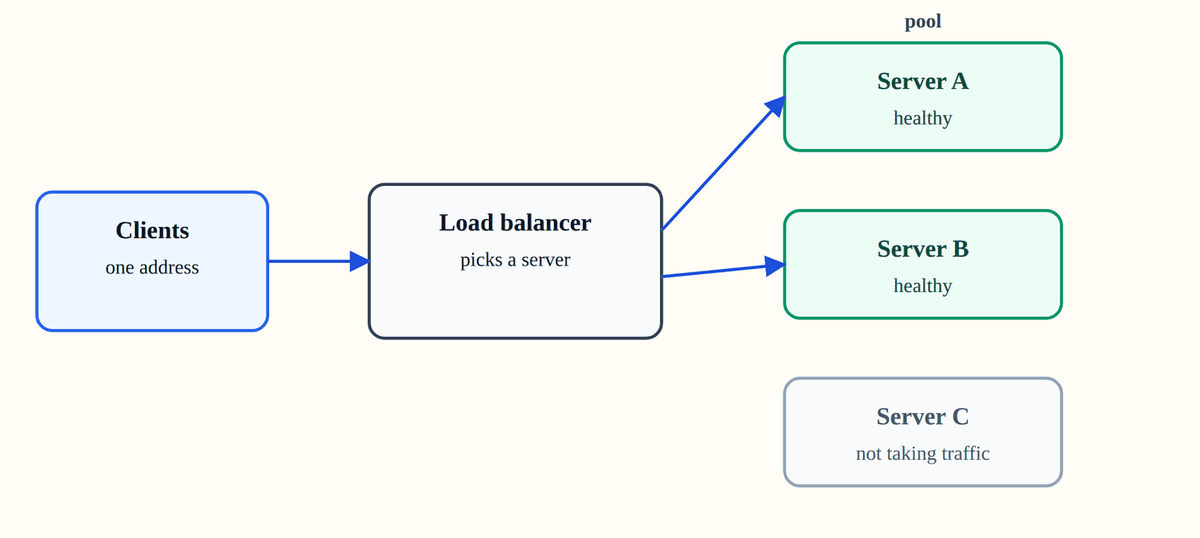
The client does not need to know how many servers exist, what their addresses are, or which one is busy. It needs the balancer's address.
Without one, every client keeps the list
Suppose one API has three servers and three client apps. Without a load balancer, every app needs the list of three addresses. Each app must pick one, notice when one dies, and try another. That logic then lives in every client you ship.
You must change the address list in every client when you add a server, or leave the new server idle. You must change the list again when you remove a server to maintain it.
A load balancer chooses in one place. Clients get one address. You can add, remove, or replace servers behind it.
One address, more room, fewer visible failures
Suppose traffic doubles. You add a server and tell the balancer. Clients keep the same address, so no client changes.
Suppose a server dies. The balancer stops sending it traffic. The next request goes to another server, and the client may not notice.
Suppose you need to upgrade a server. Take it out of the pool, upgrade it, and put it back. The other servers keep serving.
The cost is that the balancer now sits in the request path. The rest of the post explains what that means.
How the request moves
A request for /images/logo.png arrives at the balancer at 203.0.113.10:443. The balancer picks 10.0.0.2:8080 and forwards the request. The response comes back through the balancer.
The balancer can choose once for a connection, or once for every request. Layer 4 and layer 7 differ in what they can see. Layer 4 is the transport layer, where connections live. Layer 7 is the application layer, where HTTP requests live.
What layer 4 sees, and what layer 7 sees
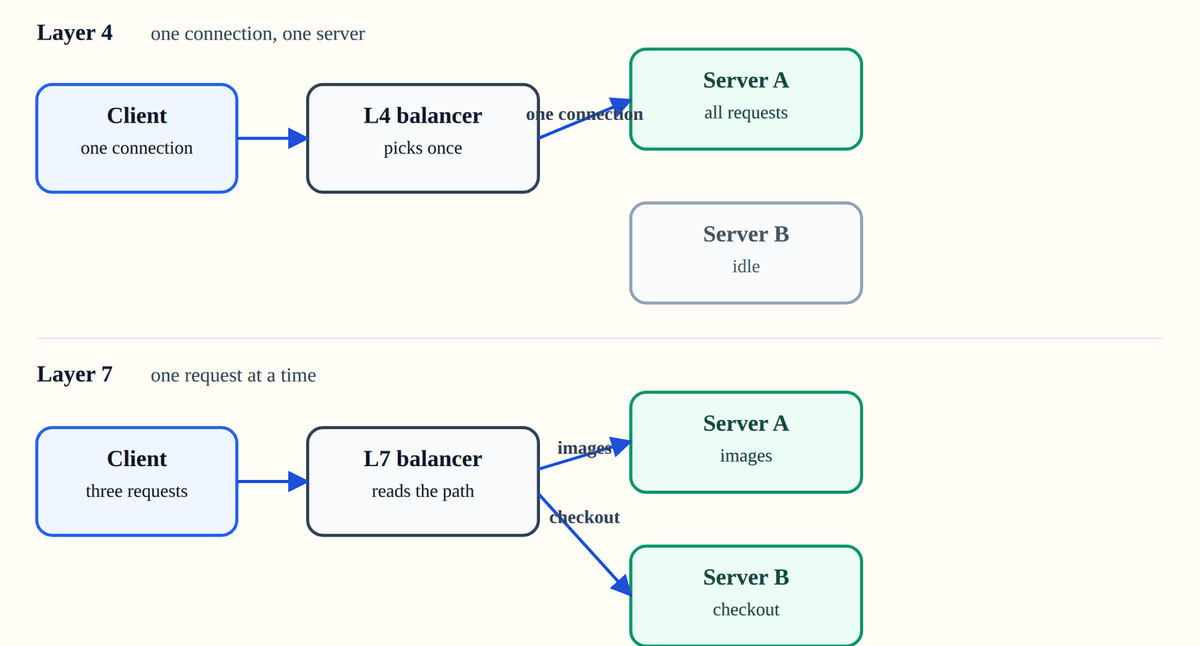
A layer 4 load balancer works with connections. It sees IP addresses and ports on TCP (Transmission Control Protocol) connections (RFC 9293). It does not see HTTP paths or headers. It chooses a server when a connection opens and sends every request on that connection to the same server.
Layer 4 does not parse the request, so it can forward protocols it does not understand. It is also blind to the request. If one request is a slow search and the next is a quick order, the balancer cannot move the quick one to another server. Both sit on the same connection.
A layer 7 load balancer reads the request. It can see the method, path, and headers. That means it can choose a server for each request, and it can send /images to one pool and /checkout to another.
Layer 7 also depends on the protocol. It is useful for HTTP and less useful for a protocol it cannot parse.
Unequal requests break round robin
The simplest method is round robin. Server A gets the first request, B gets the second, C gets the third, then A again. Round robin keeps one counter for the next turn. It does not use request cost.
Round robin gives each server one turn. The rule has no input for request cost. One request may finish quickly, while another holds its server for much longer. Equal turns then become unequal work.
Suppose two slow searches and one quick order arrive together. Round robin sends the first search to A, the order to B, and the second search to A. A stays busy while B finishes and sits idle.
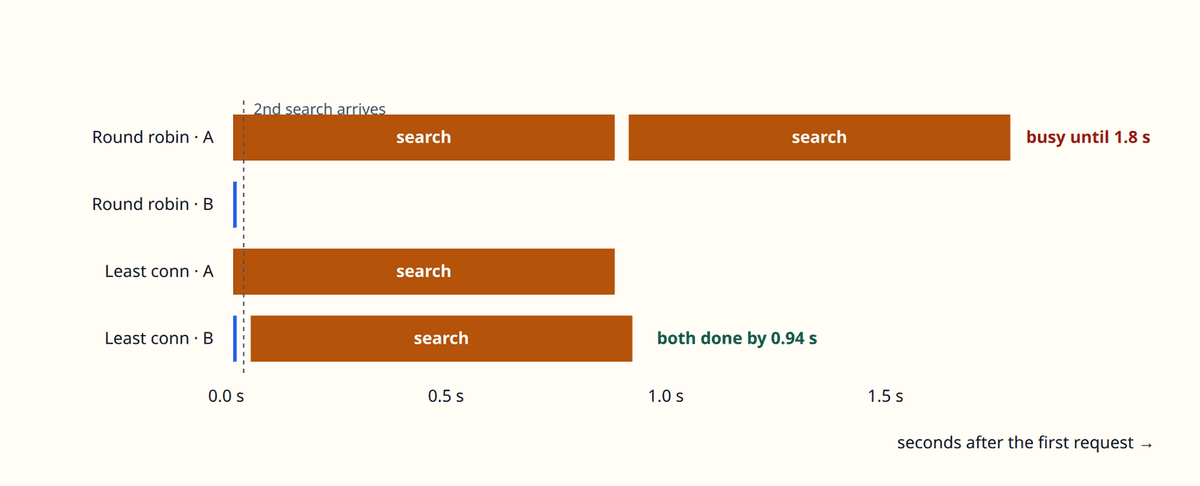
Round robin has one weakness: it ignores active work. This method sends the next request to the server with the fewest active connections. A busy server gets skipped until it catches up.
Least connections looks at the number of active connections. It does not use request cost. A slow request holds one connection for a long time. A fast request holds one for a short time.
A shallow check can miss a failed order
A load balancer needs to know which servers can take traffic. It can send a small request to each server on a schedule. That is an active check.
Another option is to watch real requests fail. That is a passive check.
The balancer sends a health check as a request:
GET /health HTTP/1.1
Host: 10.0.0.1
The balancer reads the status code. Status 200 means the path answered. It does not prove that the server can serve an order.
After enough checks fail, the server leaves the pool. After enough checks succeed, the balancer puts it back.
A check that tests only the process can pass while orders fail. A check that queries the database can fail when the database fails. If every server checks the same dependency, the dependency can fail every server at once.
This is why the check should match the problem you care about. Check that the process can answer, then watch the error rate for the work that matters.
The extra network step has a price
A load balancer adds a hop, which is one network step. The request goes to the balancer, then to a server. The balancer is another machine to run and monitor.
The balancer is now part of the request path. If it fails, clients cannot reach the pool. If you run a second balancer, it can take over when the first fails.
The balancer can keep a client on one server. That is a sticky session.
The server must then keep the client's state. If it dies, the state goes with it. If the state lives in a store both servers can reach, any server can serve the next request.
Sometimes the hop buys nothing
The first case is a service with one server and steady traffic. One server handles the whole load, so a second server would sit idle.
The second case is a static site with no dynamic requests. A cache close to the client already serves the files.
A service whose database is the bottleneck does not get faster by adding servers. Fix the database or the query first. The database still does the same work.
common questions
Is a load balancer a reverse proxy?
RFC 9110 calls a gateway a reverse proxy. See [RFC 9110, section 3.7](https://www.rfc-editor.org/rfc/rfc9110.html#section-3.7). A reverse proxy forwards requests to servers. A load balancer is a reverse proxy that also chooses among servers.
Does it make my app faster?
The balancer receives the request, then forwards it to a server. The balancer helps with capacity and failures, not with the speed of one request.
What happens if the balancer fails?
If there is only one, the service is down. Run more than one and give clients a way to reach a working balancer.
Do I need sticky sessions?
Only when a server holds state the next request needs, such as an in-memory cart. A store both servers can reach lets any server serve the next request.
references
- RFC 9110: HTTP Semantics, section 3.7 ↗
- RFC 9293: Transmission Control Protocol ↗
- RFC 6265: HTTP State Management Mechanism ↗
- AWS: How Elastic Load Balancing works ↗
- AWS: Health checks for Application Load Balancer target groups ↗
- NGINX: HTTP load balancing ↗
- NGINX: HTTP health checks ↗
- Envoy: Supported load balancers ↗
- Envoy: Outlier detection ↗
leave a note