Request timeouts: how long to wait, and when to retry
A client sends a request at 0 seconds. The service answers at 30 seconds. Nothing in the client says stop. For those 30 seconds it holds a connection, a worker, and memory for an answer that has not arrived. A request timeout sets that limit. It decides how long your app waits before it gives up.
How long do you wait?
A timeout is the maximum time a client waits for a request to complete. Amazon Web Services (AWS) sets one on every remote call, and it sets two: a connection timeout and a request timeout. The Requests library ships without a default, and its docs say why: "Failure to do so can cause your program to hang indefinitely."
Example: a client with a 2-second timeout sends a request at 0 seconds. The service answers at 30 seconds. The client leaves at 2 seconds, and the answer arrives to nobody.
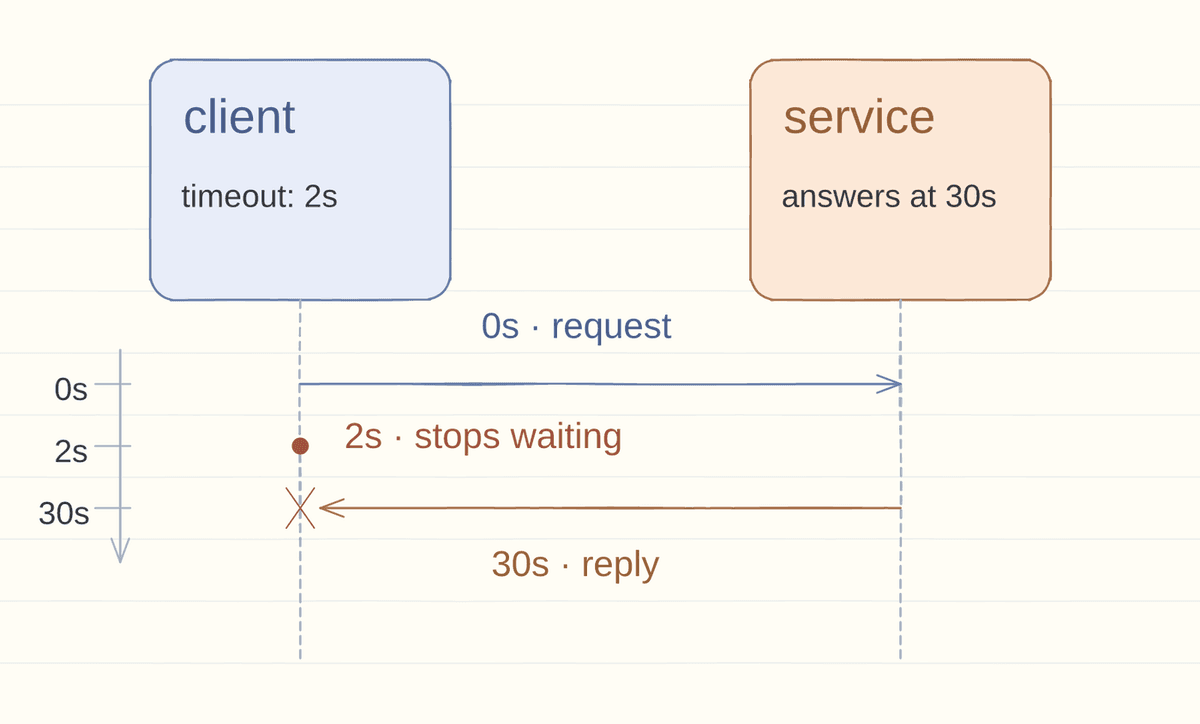
Those resources stay reserved until the answer arrives or the wait ends. AWS puts the risk this way. "If a large number of requests hold on to resources for a long time, the server can run out of those resources."
The limit is narrower than the name suggests. In Requests it does not cover the whole download. It fires when no bytes arrive for that many seconds.
The pool fills up
Example: 50 requests arrive each second, and each call hangs for 30 seconds. That is 50 × 30 = 1,500 calls in flight. Workers and connections are fixed, so new requests queue behind the stuck ones.
In the same setup, a pool of 100 workers faces 1,500 calls. That is 15 times more work than it can run. The queue grows, callers give up, and the app appears down while the code is fine.
Choosing the number
Measure how long the downstream service takes. AWS chooses an acceptable false-timeout rate, 0.1% for example.
AWS takes the matching percentile from the dependency. In this example it is p99.9. 99.9% of calls finish faster than that value. A limit near that value fails about one call in a thousand on a healthy day.
If the limit is too high, resources stay pinned. If it is too low, healthy calls fail. Those calls get retried, and the retries add traffic.
The limit splits in two: a connection timeout and a request timeout.
The AWS Builders' Library describes one team that traced rare timeouts to connection setup. A new secure connection took longer than 20 milliseconds, so a few requests failed right after a deploy. Opening connections at startup removed the problem.
Retries make it worse
When a service is busy, "frequent client retries can prevent the service from recovering and worsen the problem." Azure's guide calls that a retry storm. When the retries arrive together, it is a thundering herd.
The AWS Builders' Library says the same. Retries "can amplify the load on a dependent system," and against an overloaded service they can "make the overload worse instead of better." AWS's client libraries retry only when the dependency looks healthy. They stop when retries stop helping.
Retries also multiply work. When N clients retry together, the total work grows with N squared, according to AWS's jitter analysis.
Backoff, waiting longer after each failure, helps a little. Jitter, a random delay before each retry, spreads the spikes. In AWS's 100-client simulation, jitter cut call counts by more than half.
Cap the attempts and the total retry time. Azure's guide puts the cap at seconds or minutes, not forever.
Retry only calls you can repeat. A write that timed out may still have happened, so retries need idempotent operations, which can run twice without harm.
Deadlines for nested calls
Three calls with 2-second limits can burn 6 seconds before the first error reaches the user.
Give the whole request one deadline and pass what remains to each step. A 2-second budget spends 300 milliseconds on the first call. The rest of the chain gets 1.7 seconds and fails before the user does.
// The fetch aborts with a TimeoutError DOMException after 2 seconds.
const response = await fetch(url, { signal: AbortSignal.timeout(2000) });
The signal aborts with a TimeoutError when the time passes, as MDN documents. A caller can catch the error and tell it apart from a network failure.
Abort closes your side
Aborting a call closes your side of the connection. The remote service may keep working unless that service watches for the client to cancel. AWS is blunt about what that leaves open: "A timeout or failure doesn't necessarily mean that side effects haven't happened."
The timeout buys back your resources. It does not buy back theirs.
Without that number, a service has no limit on how long it can take. Its slowest dependency decides.
common questions
Is a timeout the same as a retry?
No. A timeout ends one attempt. A retry starts another, and it needs a safe call, a capped delay, and a limit on attempts.
Does a timeout stop the server work?
No. It ends your wait. The remote service keeps running unless that service watches for the client to cancel, and a 30-second call can finish long after your 2-second limit.
leave a note